Category: Accessibility
-
Universal Design for Learning: Using Miro
Accessibility, All Articles, Digital Learning, Innovative Technology, Learning Design, Miro, Spotlight PostWelcome back to LCC’s Digital Learning team’s series on using digital learning platforms to help implement Universal Design for Learning principles in your teaching practice. In this post, our second in the series, we are focusing on using Miro. If you missed our first post on using Padlet, you can…
Written by
-
Learning Design Principles: Spotlight on Universal Design for Learning
Accessibility, All Articles, Digital Learning, Learning Design, Spotlight Post, Teaching and LearningHow can we create a learning environment that challenges and engages everyone? In this blog post, we’re going to take a closer look at the learning design principle of Universal Design for Learning, consider how this might help us in the areas of inclusivity and accessibility, and reflect on possible take-aways…
Written by

-
How to write user friendly content for online platforms
It is important to target your audience when writing within an online environment. By knowing whom you are writing for, you can write at a level that will be meaningful for them. Students will visit your content with a task in mind, you need to write and structure your writing…
Written by

-
Create accessible documents using Apple Pages and Keynote.
What is digital accessibility? Digital accessibility means removing barriers to access and understand digital documents, activities and platforms by people who have a range of neuro-divergent needs and learning disabilities. For example, people with dyslexia often rely on clear headings, high contrast colours, and uncluttered backgrounds to help them navigate…
Written by
-
Ally: Digital Accessibility in Moodle
Digital accessibility is an essential component for an inclusive approach to teaching online. As Moodle is a website it must align with WCAG 2.1 Level AA guidelines. Our learning material must be digitally accessible so that it can be used by everyone, especially disabled and neurodiverse students, approximately 25% of…
Written by
-
Colour Change
17% of students have declared themselves as being Dyslexic at UAL which is on par with the national figure of 16%. However the number of people working in the creative industry who are neurodiverse is higher with some reports doubling the figure to 32%. Which is a 3rd of the…
Written by
-
Make Accessibility a Habit: PDF Files
The predominant file type on Moodle is PDF. In 2021, there we as many as 10,821 PDFs on LCC Moodle sites alone, which is roughly equivalent to 16 PDFs per site! Providing we have carried out the accessibility checks and followed good practice with Word documents and Presentation slides layout…
Written by
-
Make accessibility a habit: Power Point
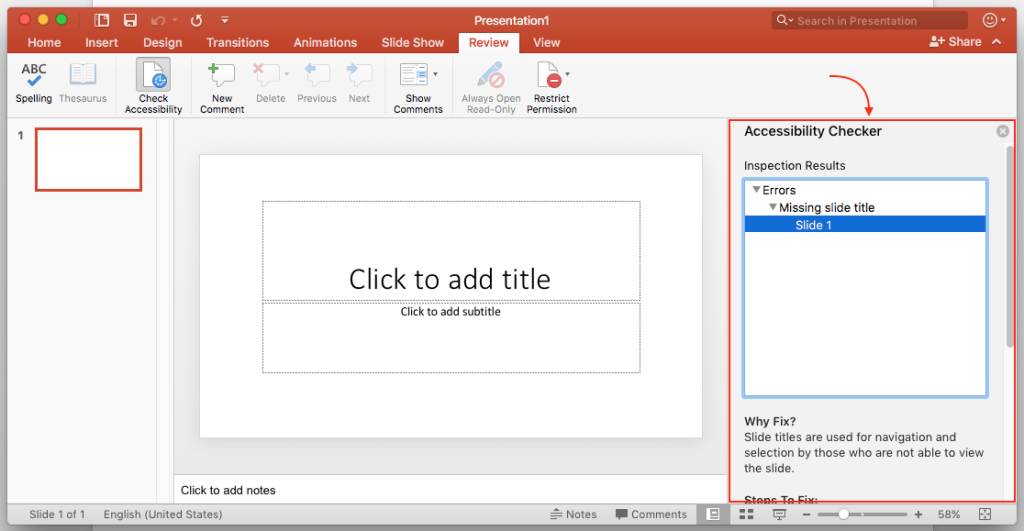
As with word documents you want to make your presentations accessible. If you follow a few simple guideline during the design process your presentations will be easier to read and process for everyone. In this blog post we are going to look at the following; Font Size Contrasting Colours Alternative…
Written by
-
Integrated Dictation Tools
Dictation or speech to text is often a forgotten about tool. If you or your students are visually impaired or you find it useful to verbally express your thoughts or for notetaking, then it’s worth exploring dictation tools. It can also be used for giving formative feedback on word and…
Written by
-
Capitalise on Captions
Captions for video content are embedded into everyday media consumption such as YouTube, Netflix and other social media platforms. As much as 92% of videos on mobile devices are viewed without sound. Therefore when students come into learning environments they have the expectation of captions on their educational media. It…
Written by